Posts

Showing posts with the label pygame

Midi musical intrument controllers and synthesizers with python and pygame

Image
Musical Instrument Digital Interface (Midi), is for letting digital musical instruments talk to each other in 'real time'. It came from the early 80s, and is still used today. The main idea is that rather than sending audio data, it sends small control messages. This is great for fast real time low bandwidth communication. I'm going to show in all the different ways midi can be used with python/pygame with three separate programs, and how to set up a virtual synth (I've included instructions for Win, Mac, and Linux). Full article is available for patrons first as an "early access" before it becomes available to all in a month:  https://www.patreon.com/posts/midi-music-pygame-python-43826303 You can support my pygame development and read my development log at: https://www.patreon.com/pygame

Finger painting with multi-touch in python using pygame 2

Image
pygame 2 has support for Multi-Touch. You know, where it can track multiple fingers. I've made an app and tutorial to show off the new Multi-Touch features. Finger Painting with Multi-Touch   Full article is available for patrons first as an "early access" before it becomes available to all in a month: https://www.patreon.com/posts/finger-painting-with-multi-touch-pygame2-43786073 You can support my pygame development and read my development log at: https://www.patreon.com/pygame

Draft 3 of, ^Let's write a unit test!^

Image
So, I started writing this for people who want to 'contribute' to Community projects, and also Free Libre or Open source projects. Maybe you'd like to get involved, but are unsure of where to begin? Follow along with this tutorial, and peek at the end in the "what is a git for?" section for explanations of what some of the words mean. Draft 1, 2018/07/18 - initial draft. Draft 2, 2019/11/04 - two full unit test examples, assertions, making a pull request, use python 3 unittest substring search, "good first issue" is a thing now. Started "What is a git for? Jargon" section. Draft 3, 2020/12/12 - default branch name is main. What's first? A test is first. A unit test is a piece of code which tests one thing works well in isolation from other parts of software. In this guide, I'm going to explain how to write one using the standard python unittest module, for the pygame game library. You can apply this advice to most python pr...

Experiments with new low latency PyPy garbage collector in a thread.

Image
TLDR; less performance spikes, faster average performance, PyPy is a good Python for games and multimedia apps on desktop systems, running GC in a thread is a good idea for GIL releasing apps. In March 2018 at the PyPy winter sprint I spent some days working on improving pygame support on PyPy. Part of this was investigating pypy frame drop . In there I found PyPy had both lower average performance in this pygame-using-CPython-API benchmark, and had spikes which caused frame drops. Remember that in latency sensitive applications performance spikes are not allowed. Note that not very much of this code is pure python (where PyPy is fastest), so it's almost a worst case benchmark for PyPy performance. Thanks to Antonio, the PyPy team and their supporters — things have much improved since then. One improvement in particular is that PyPy now allows more control of when the Garbage Collection does its work. Read more about it in the blog post " PyPy for low latency systems ...

🐱‍🏍 — the first pygame 2 community game. Starting now! Are you in?

What is a 🐱‍🏍? *[0]. There was this email thread on the pygame mailing list. " About Pygame development ". One topic of that conversation was doing a community game in there for reasons(see below). I would like to do a pygame 2 community game to submit in the: - https://ldjam.com/ - https://itch.io/jam/game-off- 2018 (GameOff github jam) Ludumdare(ldjam) starts in 3 days, 7 hours. Theme not selected yet. GameOff finishes in 4 days 2 hours. Theme is "Hybrid ", Jam already started. So, the Jams finish in 4.1 days.   Are you in?  If so join the web based chatroom (discord) in the "#communitygame" channel. Our repo: https://github.com/pygame/stuntcat I'm trying to form a team now. ... read more?... click.... loading... loading... buffering... loading... refresh... loading... So why do this? My reasons for doing this are to push me to get pygame 2 features done that are actually u...

pygame 2 update - the examples all work

Image
  🎮👾👽🎮👾👽🎮👾👽🎮👾👽 examples/ chimp.py works 👽🎮👾👽🎮👾👽🎮👾👽🎮👾 That's a nice milestone for pygame 2 development. (and also, now these examples also work...     python -m pygame.examples.aliens     python -m pygame.examples.scroll ) I'm pretty sure all the examples are now working with SDL2/pygame 2. New SDL2 functionality. Also we have some new SDL2 functionality exposed     (experimentally, the APIs are not done yet). Multitouch, and AudioDevice, along with an example of recording audio. @dlon has been fixing a number of bugs(implementing key repeat, fixing unicode issues) and also prototyped some Window/Renderer classes (using ctypes and python). The new events are done in a backwards compatible way, so that games using them with pygame 1/SDL1 will still work. You just won't get the events. if event.type == pg.AUDIODEVICEADDED:     prin...

Josh Bartlett — pygame Artist in Residence

Image
The pygame Artist in Residence grant celebrates the Python arts community and lends a tiny bit of support to someones art practice. Josh Bartlett was the first recipient. An artist residency usually works something like; a person spends some time in either a gallery making something to present or in a music club doing a weekly spot. The pygame artist in residence will do it in their own space, but be present on the top of the pygame website in the form of a thumbnail and a link to their patreon/blog/artist statement/website/whatever. Josh Bartlett was the first recipient, and has been featured on the pygame website in October.  Please see the pygame artist in residence profile page for more info. What has he been up to?  Go to his blog to find out. ps. Thank you to everyone who applied, and those who helped with selection. Hopefully the next one will go more smoothly as the process is improved.

pygame artist in residence grant

Image
An artist residency usually works something like; a person spends some time in either a gallery making something to present or in a music club doing a weekly spot. Artist in residence. The first "pygame artist in residence" grant will be for a small amount of money (€512). It is for someone who is already doing stuff with pygame or python in their arts practice. There will be a little thumbnail on the website linking towards an artist statement/patreon page/blog or some such. The residency won't be in a physical space. It lasts for a month, from October 1st - November 1st. At the end of the month the website 'exhibition' will take the form of a small update from the artist — in whatever form that takes . If you'd like to apply(or nominate someone) please write something short with a link about the arts practice and how python or pygame is used in it. Email: residency@pygame.org Applications close: September 15th. Announced: October 1s...

Draft of, "How to port and market games using #python and #pygame."

This is a collaborative document, and a really early draft. Please feel free to add any tips or links in a comment here or on the reddit post https://www.reddit.com/r/pygame/comments/9aodt7/collaborative_doc_lets_write_pygame_distribution/ You've spent two years making a game, but now want other people to see it? How do you port it to different platforms, and make it available to others? How do you let people know it is even a thing? Is your game Free Libre software, or shareware? All python related applications are welcome on www.pygame.org . You'll need a screenshot, a description of your game, and some sort of URL to link people to (a github/gitlab/bitbucket perhaps).  But how and where else can you share it? a few platforms to port to itch.io and windows windows store? mac (for itch.io) mac store steam linux 'flatpack' (latest fedora/ubuntu etc use this like an app store). pypi (python packages can actually be installed by lots of people...

pygame 1.9.4 released

Image
pygame 1.9.4 has been released into the wild! TLDR; Some highlights. python 3.7 support. beta pypy support. See Are we pypy yet? . pygame.draw fixes pygame.math is not experimental anymore. Speedups and bugfixes. Debian, Mac homebrew, mac virtualenv, manylinux and other platform fixes. documentation fixes, jedi support for type ahead in editors like VSCode and VIM. Surface.blits for blitting many surfaces at once more quickly. Thanks A very special thanks to the people who have volunteered commits to pygame since the last release. In alphabetical order... Adam Di Carlo ( @adicarlo ) | Christian Bender ( @christianbender ) | Don Kirkby ( @donkirkby ) | endolith ( @endolith ) | hjpotter92 ( @hjpotter92 ) | Ian Mallett ( @imallett ) | Lenard Lindstrom ( @llindstrom ) | Mathias Weber ( @mweb ) | Matti Picus ( @mattip ) | Nicholas Tollervey ( @ntoll ) | ( @orangudan ) | Raymon Skjørten Hansen ( @raymonshansen ) | René Dudfield ( @illume ) | Stefan Bethge ( @kjyv ) | Stu...

pygame.Surface.blits

Drawing many things at once is faster than drawing things one thing at a time. So, today I made a function to do this with pygame. It seems to take between 82%-85% of the time it takes to draw things one at a time. Which considering blit is often the bottleneck in many pygame apps is a pretty nice improvement. It will be landing in the pygame 1.9.4 release. More info in the blits Pull Request .

Investigating pypy frame drop

Image
pypy has spikes in time it takes occasionally when using cpyext, otherwise known as pauses. This is because it's deallocating lots of CPython objects all in one frame, rather than incrementally. This is likely to be addressed in a future release of pypy. Mainly it's a problem when creating and deleting lots of CPython objects (like pygame.Rect). Not pure python objects. To work around it for now, the src/rect.c has been changed to have a free list of python objects, so it doesn't alloc and dealloc them. Instead it maintains it's own list of rect PyObject pointers, and reuses them. This is done in PR #431 Use PYPY_GC_NURSERY=1m incminimark environment variables when running pypy. Below are timings of the default pygame, and default pypy (at time of writing). Then a benchmark showing the improvement with the rect freelist implemented in rect.c inside pygame. Then we also improve things by setting PYPY_GC_NURSERY=1m environment variable to change the ...

Windows pypy pygame build for testing.

Image
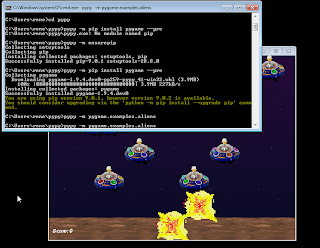
How to install pypy (fast python written in python) on windows and use the pygame dev build. pypy running pygame.examples.aliens on Windows 1) Get pypy. It's just a zip folder with all the stuff inside. https://bitbucket.org/pypy/pypy/downloads/pypy2-v5.10.0-win32.zip Unzip, and put into C:\pypy, so C:\pypy\pypy.exe exists. OR get the pypy3.exe from https://bitbucket.org/pypy/pypy/downloads/pypy3-v5.10.1-win32.zip Unzip, and put into C:\pypy3, so C:\pypy3\pypy3.exe exists. 2) Set the PATH environment variable, so that pypy.exe is found in your command prompt. https://www.opentechguides.com/how-to/article/windows-10/113/windows-10-set-path.html Or you can just do this each time you run a new cmd prompt. set PATH=%PATH%;C:\pypy\;C:\pypy3\ Or just cd C:\pypy to test it out. 3) Ensure pip is installed (pip is a weirdly named tool for installing things). pypy.exe -m ensurepip 4 ) Install a dev build of pygame. pypy.exe -m pip install pygame --pre 5...

pygame on pypy usable

Image
Hi, TLDR; I'm at the pypy sprint, and working through the remaining pygame-on-pypy-cpyext issues. https://youtu.be/WN1slc5O8os Surprisingly to me... it's already usable. That is pygame (same one that runs on cpython), works on pypy through its C extension API. pypy has good support for the CPython API (through a recompile) now. PyPy is the python language with a fast JIT, so your code can approach C speeds. And in some cases it can be faster than C. There was an issue with events stopping keyboard/mouse/etc from working. Lots of details in this issue describing the changes needed, so I hope other extensions encountering this will find it useful. https://github.com/pygame/ pygame/issues/419 But now that's fixed, every pygame app I tried on it has worked. Cat sitting in the fog and snow of Switzerland Why is this exciting? This is exciting to me because: pure python code being fast on pypy(after warmup), also mixed with the fast bit...