Posts

Showing posts with the label sprint

Investigating pypy frame drop

Image
pypy has spikes in time it takes occasionally when using cpyext, otherwise known as pauses. This is because it's deallocating lots of CPython objects all in one frame, rather than incrementally. This is likely to be addressed in a future release of pypy. Mainly it's a problem when creating and deleting lots of CPython objects (like pygame.Rect). Not pure python objects. To work around it for now, the src/rect.c has been changed to have a free list of python objects, so it doesn't alloc and dealloc them. Instead it maintains it's own list of rect PyObject pointers, and reuses them. This is done in PR #431 Use PYPY_GC_NURSERY=1m incminimark environment variables when running pypy. Below are timings of the default pygame, and default pypy (at time of writing). Then a benchmark showing the improvement with the rect freelist implemented in rect.c inside pygame. Then we also improve things by setting PYPY_GC_NURSERY=1m environment variable to change the ...
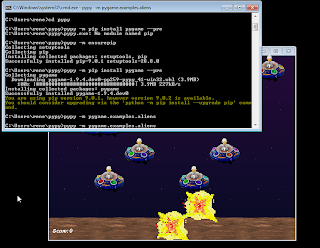
Windows pypy pygame build for testing.

Image
How to install pypy (fast python written in python) on windows and use the pygame dev build. pypy running pygame.examples.aliens on Windows 1) Get pypy. It's just a zip folder with all the stuff inside. https://bitbucket.org/pypy/pypy/downloads/pypy2-v5.10.0-win32.zip Unzip, and put into C:\pypy, so C:\pypy\pypy.exe exists. OR get the pypy3.exe from https://bitbucket.org/pypy/pypy/downloads/pypy3-v5.10.1-win32.zip Unzip, and put into C:\pypy3, so C:\pypy3\pypy3.exe exists. 2) Set the PATH environment variable, so that pypy.exe is found in your command prompt. https://www.opentechguides.com/how-to/article/windows-10/113/windows-10-set-path.html Or you can just do this each time you run a new cmd prompt. set PATH=%PATH%;C:\pypy\;C:\pypy3\ Or just cd C:\pypy to test it out. 3) Ensure pip is installed (pip is a weirdly named tool for installing things). pypy.exe -m ensurepip 4 ) Install a dev build of pygame. pypy.exe -m pip install pygame --pre 5...

pygame on pypy usable

Image
Hi, TLDR; I'm at the pypy sprint, and working through the remaining pygame-on-pypy-cpyext issues. https://youtu.be/WN1slc5O8os Surprisingly to me... it's already usable. That is pygame (same one that runs on cpython), works on pypy through its C extension API. pypy has good support for the CPython API (through a recompile) now. PyPy is the python language with a fast JIT, so your code can approach C speeds. And in some cases it can be faster than C. There was an issue with events stopping keyboard/mouse/etc from working. Lots of details in this issue describing the changes needed, so I hope other extensions encountering this will find it useful. https://github.com/pygame/ pygame/issues/419 But now that's fixed, every pygame app I tried on it has worked. Cat sitting in the fog and snow of Switzerland Why is this exciting? This is exciting to me because: pure python code being fast on pypy(after warmup), also mixed with the fast bit...